Tables and Teams function the same way in Swell. If you're using either, you'll want to take a look at this section of the Email Editor.
It contains 6 emails, Table/Team Host Email, Email to Guest When Guest Declines, Table Guest Invitation, Email to Host When Guest Declines, Table Purchase Receipt, and Email to Host When Guest Accepts.
Knowing how the table process works will help you decide which emails to edit in this section.
Table/Team Host Email
This email is sent to table hosts so s/he can invite his/her guests to join them.
Email to Guest When Guest Declines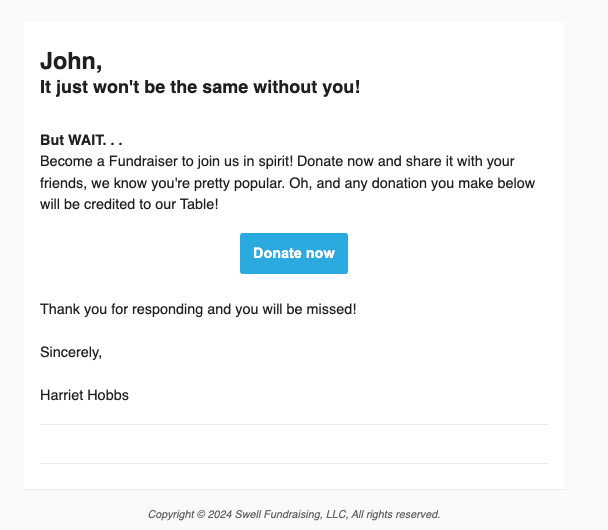
Table Guest Invitation
This email is sent to each guest when a table host invites them to his/her table or team.
Note: The “Confirm” and “Decline” buttons in the Table Guest Email contain system-generated links.
When a guest clicks Confirm or Decline, the system automatically:
- Updates their RSVP status
- Issues a ticket if they confirm
- Notifies the table host
- Triggers the appropriate follow-up emails
Because those actions are tied directly to the system-generated links, they’re not truly editable.
Email to Host When Guest Declines
This email lets hosts know an intended guest is unable to attend so they can invite someone else.
Table Purchase Receipt
This is sent to table hosts/team captains when they purchase a table/team for your event.
Tip: Receipt emails have default tax language in the footer. You can and should customize this with your organization's own tax language.
Email to Host When Guest Accepts
Hosts want to know their invitations are working. This email goes to the table host/team captain when a guest accepts their invitation.
Comments
0 comments
Article is closed for comments.